

Understanding which ledger belongs to which group in Tally is one of the first challenges most beginners face. The ledger name may look obvious — such as Salary, Rent, Cash, or GST — but selecting the correct group in Tally Prime often creates confusion. Students learning accounting and even new office accountants frequently stop at this step while creating a ledger.
This guide clears that confusion with a simple and practical explanation. You will find the complete Tally ledger group list, clear examples of common ledgers and their correct groups, a practical table of 50 frequently used ledgers, and a step-by-step method to check ledger groups in Tally Prime. A downloadable PDF reference sheet is also included later in the article so you can quickly check ledger groups while practicing or working in Tally.
Correctly placing a ledger under the right group keeps your Balance Sheet, Profit & Loss account, and Trial Balance properly organized. Once this concept becomes clear, working in Tally becomes much faster and more accurate.
Table of Contents
What is Tally Ledger Group List?
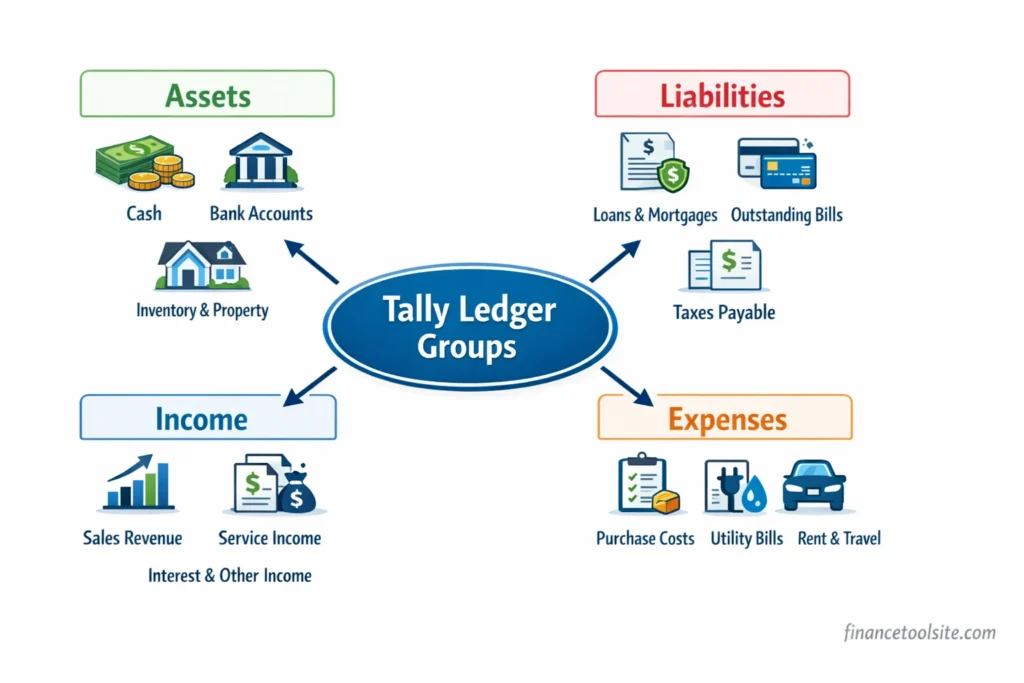
The Tally ledger group list refers to the predefined accounting groups available in Tally Prime under which every ledger must be created. These groups act as a classification system that organizes business transactions into the main accounting categories: Assets, Liabilities, Income, and Expenses.
Every ledger created in Tally — whether it is Cash, Bank, Salary, Purchases, or GST — has to be placed under one of these groups. This structure allows Tally to automatically prepare financial reports like the Balance Sheet, Profit & Loss Account, and Trial Balance without manual sorting.
Proper grouping ensures that accounts remain structured, balanced, and easy to analyze. In professional accounting practice, the same classification principles are also followed in financial reporting frameworks and accounting standards published by the Institute of Chartered Accountants of India (ICAI).
What is a Ledger in Tally?
A ledger in Tally represents an individual account where financial transactions are recorded. Every account used in business — such as cash, bank balance, salary expense, or sales income — is maintained as a separate ledger. In traditional bookkeeping, each account used to have its own page in a physical ledger book. Tally follows the same accounting principle but manages everything digitally.
Every accounting entry recorded in Tally affects at least two ledgers because the system follows the double-entry accounting principle. For example, a rent payment reduces the business bank balance while recording rent as an expense. In this case, the entry appears in the Rent ledger as well as the Bank or Cash ledger.
Common examples of ledgers created in Tally include Cash, SBI Bank Account, Salary, Purchases, Sales, GST Output Tax, and Sundry Debtors. Each of these ledgers must be placed under an appropriate group so that Tally can correctly classify the transaction in financial reports such as the Trial Balance, Profit & Loss Account, and Balance Sheet.
For example, bank charges recorded by the bank are usually classified under indirect expenses in most businesses. If you want a detailed explanation with examples, you can read our guide on bank charges under which head in tally.
Similarly, transactions like commission paid or commission received are also common in many businesses and must be placed under the correct group depending on whether they are treated as income or expense. We have explained this in detail in our article on commission under which group in tally.
What is a Group in Tally?
A group in Tally acts as a classification category that tells the software where a ledger should appear in financial reports. Groups organize ledgers in a structured way so that Tally can automatically place transactions in the correct section of the Balance Sheet or Profit & Loss Account.
The group selected for a ledger determines several important things. It decides whether the ledger will appear in the Balance Sheet or the Profit & Loss Account, how the transaction will be treated in accounting (asset, liability, income, or expense), and how it will impact reports such as the Trial Balance and final accounts.
Tally Prime already includes 28 predefined groups, which are arranged under four main accounting categories:
- Assets – such as Fixed Assets, Current Assets, Bank Accounts, and Cash-in-Hand
- Liabilities – including Capital Account, Current Liabilities, and Loans
- Income – such as Sales Accounts, Direct Income, and Indirect Income
- Expenses – including Purchase Accounts, Direct Expenses, and Indirect Expenses
Beginners often hesitate at this stage because the ledger name alone does not always make the correct group obvious. A simple way to identify the right group is to first understand the nature of the transaction. Once it becomes clear whether the item is an asset, liability, income, or expense, selecting the correct group in Tally becomes much easier.
Complete Tally Ledger Group List

Tally Prime provides several predefined accounting groups that help organize different types of ledgers in a structured way. Each group represents a particular category of accounts used in business accounting. Selecting the correct group while creating a ledger ensures that transactions automatically appear in the correct section of financial reports such as the Balance Sheet, Profit & Loss Account, and Trial Balance.
In modern accounting systems, proper classification of accounts is essential for maintaining accurate financial records and tax reporting. Businesses dealing with GST transactions should also follow the official guidelines provided by the GST portal of the Government of India.
The table below shows some of the most commonly used groups in Tally, along with their type and purpose. This quick reference helps identify where a ledger should normally be placed.
| Group Name | Type | Purpose |
|---|---|---|
| Capital Account | Liability | Owner’s capital and reserves invested in the business |
| Current Assets | Asset | Short-term assets like cash, debtors, and inventory |
| Current Liabilities | Liability | Short-term obligations such as creditors or outstanding expenses |
| Loans (Liability) | Liability | Bank loans and other borrowings taken by the business |
| Fixed Assets | Asset | Long-term assets such as machinery, furniture, and land |
| Purchase Accounts | Expense | Ledgers related to purchases of goods |
| Sales Accounts | Income | Ledgers used to record sales transactions |
| Direct Expenses | Expense | Costs directly connected with production or purchase |
| Indirect Expenses | Expense | General business expenses like rent, salary, and office costs |
| Direct Income | Income | Income earned directly from core business activities |
| Indirect Income | Income | Other income not directly related to main operations |
| Duties & Taxes | Liability / Asset | GST, TDS, and other tax-related ledgers |
| Bank Accounts | Asset | Business bank accounts used for transactions |
| Cash-in-Hand | Asset | Physical cash balance maintained by the business |
| Sundry Debtors | Asset | Customers who owe money to the business |
| Sundry Creditors | Liability | Suppliers to whom the business owes money |
Tally also includes several additional groups such as Investments, Miscellaneous Expenses (Asset), Reserves & Surplus, Secured Loans, and Unsecured Loans. These groups are used less frequently in day-to-day entries but still play an important role in structuring financial statements properly.
Ledger Under Which Group in Tally – Most Common Examples
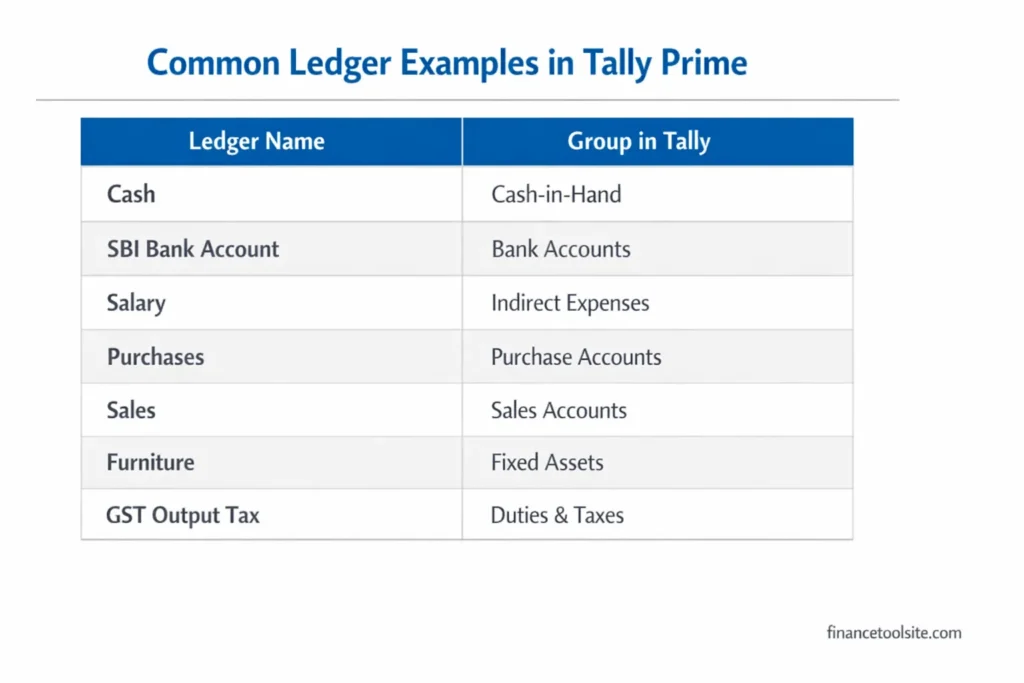
While learning Tally, a common challenge is deciding which group a particular ledger should belong to. The ledger name may sound familiar, but selecting the correct group ensures that the transaction is classified properly in accounting reports.
The table below lists some of the most frequently used ledgers along with the group they belong to and the reason behind that classification. Keeping a quick reference like this can save time while creating ledgers in Tally Prime.
| Ledger Name | Group in Tally | Reason |
|---|---|---|
| Capital | Capital Account | Owner’s investment introduced into the business |
| Drawings | Capital Account | Amount withdrawn by the owner for personal use |
| Cash | Cash-in-Hand | Physical cash available in the business |
| Bank (e.g., SBI Current A/c) | Bank Accounts | Bank account used for business transactions |
| Purchase (Local) | Purchase Accounts | Goods purchased for resale or production |
| Sales (Local) | Sales Accounts | Goods sold to customers |
| Salary | Indirect Expenses | Salaries paid to employees as part of business overhead |
| Rent | Indirect Expenses | Rent paid for office or shop premises |
| GST Input Tax Credit | Duties & Taxes | GST paid on purchases that can be claimed as credit |
| GST Output Tax | Duties & Taxes | GST collected on sales and payable to the government |
| Commission Received | Indirect Income | Commission earned from agents or services |
| Commission Paid | Indirect Expenses | Commission paid to agents or distributors |
| Electricity Expense | Indirect Expenses | Electricity bills related to office or business operations |
| Interest Income | Indirect Income | Interest earned from bank deposits or loans |
| Furniture | Fixed Assets | Long-term asset used in office or business premises |
Choosing the correct group at the time of ledger creation helps maintain accurate financial statements. Proper grouping also ensures that reports such as the Profit & Loss Account, Balance Sheet, and Trial Balance reflect the correct financial position of the business.
50 Common Ledger Examples with Group in Tally
While working in Tally Prime, accountants repeatedly create certain ledgers in almost every business. Having a ready reference of these common ledgers makes the ledger creation process faster and reduces the chances of selecting the wrong group.
The table below lists 50 commonly used ledgers along with the group they belong to in Tally. This list is useful for students practicing Tally, office accountants entering daily transactions, and anyone preparing for accounting exams. A printable version of this list is also available later in the article as part of the Tally ledger group list PDF.
| S.No | Ledger Name | Group in Tally |
|---|---|---|
| 1 | Capital | Capital Account |
| 2 | Drawings | Capital Account |
| 3 | Cash | Cash-in-Hand |
| 4 | Petty Cash | Cash-in-Hand |
| 5 | SBI Current Account | Bank Accounts |
| 6 | HDFC Savings Account | Bank Accounts |
| 7 | Purchases (Local) | Purchase Accounts |
| 8 | Purchases (Import) | Purchase Accounts |
| 9 | Purchase Returns | Purchase Accounts |
| 10 | Sales (Local) | Sales Accounts |
| 11 | Sales (Export) | Sales Accounts |
| 12 | Sales Returns | Sales Accounts |
| 13 | Furniture | Fixed Assets |
| 14 | Machinery | Fixed Assets |
| 15 | Computer | Fixed Assets |
| 16 | Land & Building | Fixed Assets |
| 17 | Closing Stock | Current Assets |
| 18 | Opening Stock | Current Assets |
| 19 | Prepaid Expenses | Current Assets |
| 20 | Sundry Debtors (Customer Name) | Sundry Debtors |
| 21 | Sundry Creditors (Supplier Name) | Sundry Creditors |
| 22 | Salary | Indirect Expenses |
| 23 | Rent | Indirect Expenses |
| 24 | Electricity Charges | Indirect Expenses |
| 25 | Telephone Charges | Indirect Expenses |
| 26 | Office Expenses | Indirect Expenses |
| 27 | Printing & Stationery | Indirect Expenses |
| 28 | Travelling Expenses | Indirect Expenses |
| 29 | Advertisement Expenses | Indirect Expenses |
| 30 | Commission Paid | Indirect Expenses |
| 31 | Depreciation | Indirect Expenses |
| 32 | Interest on Loan | Indirect Expenses |
| 33 | Bank Charges | Indirect Expenses |
| 34 | Wages | Direct Expenses |
| 35 | Freight Inward | Direct Expenses |
| 36 | Carriage Inward | Direct Expenses |
| 37 | Import Duty | Direct Expenses |
| 38 | Factory Expenses | Direct Expenses |
| 39 | Commission Received | Indirect Income |
| 40 | Interest Received | Indirect Income |
| 41 | Rent Received | Indirect Income |
| 42 | Discount Received | Indirect Income |
| 43 | Profit on Sale of Asset | Indirect Income |
| 44 | GST Input (CGST) | Duties & Taxes |
| 45 | GST Input (SGST) | Duties & Taxes |
| 46 | GST Input (IGST) | Duties & Taxes |
| 47 | GST Output (CGST) | Duties & Taxes |
| 48 | GST Output (SGST) | Duties & Taxes |
| 49 | TDS Payable | Duties & Taxes |
| 50 | Outstanding Salary | Current Liabilities |
This list covers most of the ledgers commonly created in small businesses, trading firms, and service-based companies. Referring to this table while practicing in Tally Prime helps beginners quickly understand how different transactions are classified into the correct accounting groups.
How to Check Ledger Group in Tally Prime
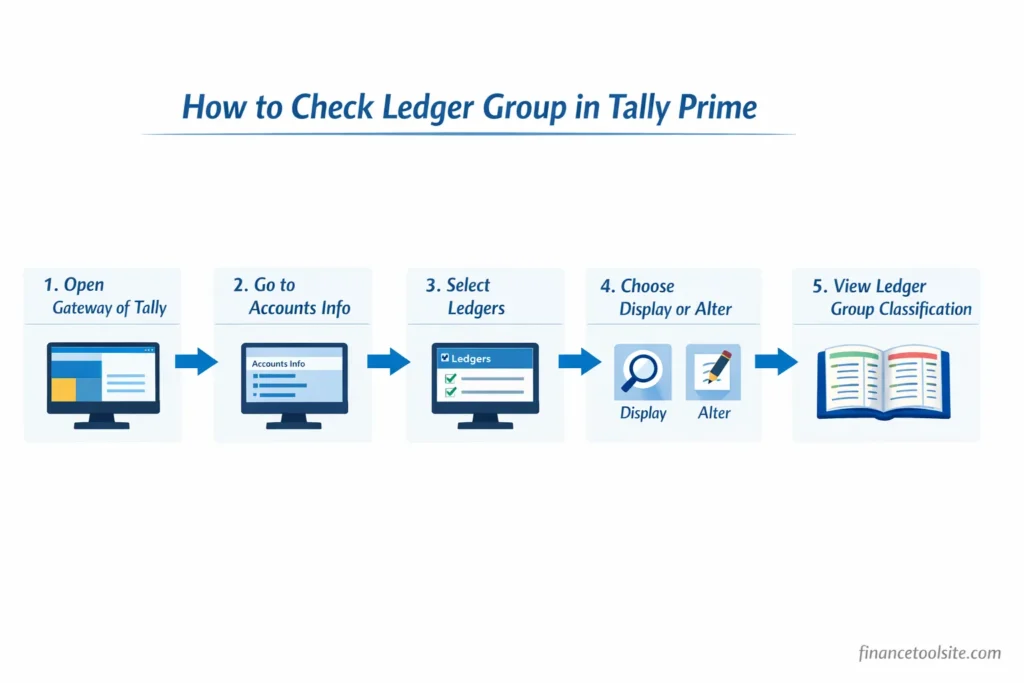
While working in Tally Prime, situations often arise where you need to confirm which group a particular ledger has been assigned to. This usually happens while reviewing accounts, correcting mistakes, or verifying how a transaction is classified in financial reports.
Tally makes it easy to check the group of any ledger. The steps below show how to quickly view this information.
Step-by-step method:
- Open Tally Prime and go to Gateway of Tally.
- Select Accounts Info (you can also press A on the keyboard).
- Choose Ledgers from the available options.
- Click Display to view an existing ledger, or select Alter if you want to edit it.
- Enter or select the ledger name you want to check.
- The ledger details screen will open, and the Group field will show the group under which that ledger is classified.
Another way to view ledger information is through reports. Navigate to:
Gateway of Tally → Display More Reports → Account Books → Ledger
This report shows detailed ledger information along with the group it belongs to.
Practical tip:
Incorrect grouping is a common beginner mistake. The issue can be fixed easily by opening the ledger in Alter mode and selecting the correct group. Tally automatically updates the classification in reports like the Trial Balance, Profit & Loss Account, and Balance Sheet, so no manual recalculation is required.
Download Tally Ledger Group List PDF
Many accounting students and working professionals prefer keeping a quick reference sheet while practicing or working in Tally Prime. Instead of searching for the correct group every time, a printable list makes it easier to verify ledger classifications in seconds.
A Tally ledger group list PDF is especially useful in situations like:
- Checking the correct group while creating a new ledger in Tally
- Quick revision before Tally exams or accounting certifications
- Helping new staff members understand ledger classification
- Using the list as an offline reference during daily accounting work
For convenience, a downloadable PDF version of the complete Tally ledger group list is provided below. This PDF includes the most commonly used ledger examples, their correct groups in Tally, and a simplified list of important accounting groups.
Keeping this PDF saved on your computer or phone can make day-to-day accounting work faster. Many accountants also prefer printing the list and keeping it near their workstation so they can quickly verify ledger groups while entering transactions in Tally Prime.
Download the complete Tally Ledger Group List PDF below for quick reference.
Common Mistakes Beginners Make When Choosing Ledger Groups
Selecting the correct group while creating a ledger is important for accurate financial reports. Beginners often know the ledger name but still choose the wrong group, which later creates confusion in the Trial Balance, Profit & Loss Account, or Balance Sheet. Understanding a few common mistakes can help avoid these issues from the start.
Mistake 1: Placing Salary under Direct Expenses
Salary is normally classified under Indirect Expenses, not Direct Expenses. Direct expenses are costs directly related to producing or purchasing goods, such as factory wages or freight charges on purchases. Office staff salaries, administrative salaries, and similar payments are part of general business overheads, so they belong to the Indirect Expenses group.
Mistake 2: Mixing up GST Input and GST Output Ledgers
GST ledgers often confuse beginners because both input and output taxes fall under the Duties & Taxes group. GST Input Tax Credit represents the tax paid on purchases that can later be claimed as credit, while GST Output Tax represents the tax collected from customers on sales. Incorrect grouping of these ledgers can lead to inaccurate tax reports in Tally.
Mistake 3: Treating Drawings as an Expense
Drawings represent the amount the business owner withdraws from the business for personal use. This transaction reduces the owner’s capital but does not count as a business expense. For that reason, the Drawings ledger should always be placed under the Capital Account group.
Many beginners mistakenly record drawings as an expense, which can distort the Profit & Loss statement and give incorrect financial results. If you want a detailed explanation with examples and journal entries, you can read our guide on drawings comes under which head in tally.
Mistake 4: Using a Single Generic Expense Group
Some beginners place every expense ledger under a single category without considering the correct classification. However, Tally already provides separate groups such as Direct Expenses and Indirect Expenses to maintain accurate profit calculations.
Direct costs like wages, freight inward, or factory expenses should be placed under Direct Expenses because they are directly related to production or purchasing activities. On the other hand, administrative costs such as rent, office expenses, or insurance premiums fall under Indirect Expenses since they are part of the general operating costs of running a business.
For example, when a business pays insurance premiums for protecting assets, employees, or property, that expense is normally recorded under the Indirect Expenses group. If you want a detailed explanation with examples and accounting logic, you can read our guide on insurance under which head in tally.
Mistake 5: Recording Outstanding Amounts under the Wrong Group
Outstanding liabilities like Outstanding Salary, Outstanding Rent, or Advances from Customers should appear under the Current Liabilities group. These amounts represent obligations that the business still needs to pay or adjust in the future. Placing them under income or expense groups can misrepresent the company’s financial position and lead to inaccurate financial reporting.
In proper accounting practice, liabilities must always be clearly separated from expenses so that financial statements reflect the true financial health of the business. Businesses preparing formal financial statements should also follow the basic accounting and reporting guidelines published by the Ministry of Corporate Affairs (Government of India).
Understanding these common mistakes helps maintain cleaner books and ensures that financial reports generated in Tally Prime remain accurate and reliable.
Frequently Asked Questions (FAQ)
Q1. What is a ledger group in Tally?
A ledger group in Tally is a predefined accounting category under which individual ledgers are created. These groups help organize transactions into the main accounting classifications such as assets, liabilities, income, and expenses. For example, the Cash ledger is placed under the Cash-in-Hand group, while Salary is usually classified under Indirect Expenses.
Q2. How many predefined groups are there in Tally?
Tally Prime comes with 28 predefined groups by default. These groups are arranged under four major accounting categories: Assets, Liabilities, Income, and Expenses. Additional sub-groups can also be created by users whenever more detailed classification is required.
Q3. Under which group does Drawings come in Tally?
The Drawings ledger is placed under the Capital Account group. Drawings represent the amount the owner withdraws from the business for personal use. Since this reduces the owner’s capital rather than creating an expense, it is recorded under the Capital Account group.
Q4. Which group is Salary under in Tally?
Salary is normally classified under Indirect Expenses. This is because salary paid to office or administrative staff is considered a general operating expense rather than a cost directly connected with production. Direct wages paid to factory workers are usually recorded under Direct Expenses.
Q5. Is Bank Account a ledger or a group in Tally?
In Tally, Bank Accounts is a predefined group. The actual bank accounts created for business transactions — such as SBI Current Account or HDFC Bank Account — are ledgers that are placed under this group.
Q6. What is the difference between a Group and a Ledger in Tally?
A Group acts as a classification category used to organize accounts in financial reports. A Ledger is the individual account where transactions are recorded. In simple terms, groups work like folders, while ledgers are the individual files stored inside those folders.
Q7. Can custom groups be created in Tally Prime?
Yes, Tally Prime allows users to create their own groups whenever additional classification is required. Custom groups can be created by navigating to Gateway of Tally → Accounts Info → Groups → Create. Businesses often use this feature to organize accounts more clearly, such as creating a separate Marketing Expenses group under Indirect Expenses.
Quick Summary
Understanding the Tally ledger group list is one of the most important fundamentals of working in Tally Prime. Every ledger created in Tally must be placed under a specific group, and that grouping determines how transactions appear in reports such as the Trial Balance, Profit & Loss Account, and Balance Sheet.
Some of the most commonly used groups include Capital Account, Current Assets, Current Liabilities, Fixed Assets, Bank Accounts, Cash-in-Hand, Sundry Debtors, Sundry Creditors, Purchase Accounts, Sales Accounts, Direct Expenses, Indirect Expenses, Duties & Taxes, and Indirect Income. Becoming familiar with these groups makes ledger creation faster and reduces accounting errors.
For quick reference during practice or daily accounting work, you can review the complete tally ledger group list above and download the PDF version provided in this guide.
Disclaimer: This article is for educational purposes only and does not constitute professional accounting advice.
1 thought on “Complete Tally Ledger Group List with Examples + Free PDF”